Convolutions


Introduction
What are Convolutions?
Convolutions are mathematical operations that combine two functions to produce a third function. In image processing, this typically involves applying a filter (kernel) to an image, resulting in feature extraction such as edges, textures, or other visual information.
This concept, originally from signal processing, forms the foundation of many modern techniques in both image and sound analysis.
Why are Convolutions Important in Neural Networks?
In neural networks, especially Convolutional Neural Networks (CNNs), convolutions help in reducing the number of parameters by using local connections, which allows for efficient processing of large images.
Convolutions preserve spatial relationships between pixels, enabling the network to detect features like edges and patterns in various layers, leading to hierarchical learning (from simple to complex features).
Mathematical Operation
Convolution Operation (1D Example):
A convolution in one dimension can be expressed as:
\[(f * g)(t) = \int_{-\infty}^{\infty} f(\tau) g(t - \tau) d\tau\]For discrete data, this becomes:
\[(f * g)[n] = \sum_{m=-\infty}^{\infty} f[m] g[n - m]\]Here, \(f\) is the input signal, and \(g\) is the kernel/filter.
2D Convolution (Image Example):
In 2D, the convolution operation is applied between an image \(I\) and a filter \(K\):
\[(I * K)(x, y) = \sum_{i=-k}^{k} \sum_{j=-k}^{k} I(x+i, y+j) K(i, j)\]where \(I(x, y)\) is the pixel value of the image at position \(I(x, y)\) and \(K(i, j)\) represents the kernel/filter.
Key Parameters:
Stride: Number of pixels by which the filter moves across the input.
Padding: Adds borders around the image to control the output size.
1D convolution
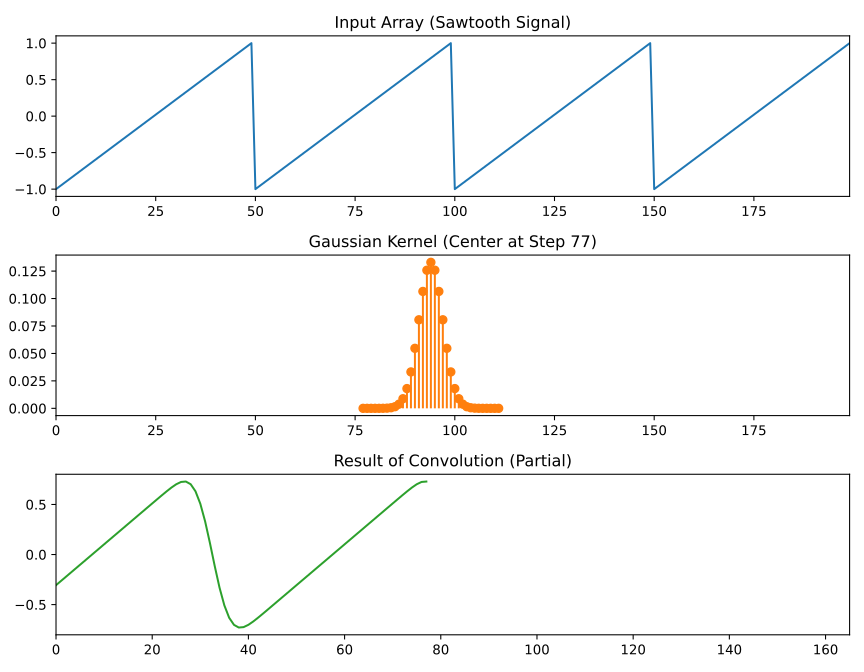
Sawtooth Signal and Adjustable Gaussian Kernel
[1]:
import numpy as np
import matplotlib.pyplot as plt
from ipywidgets import interact, IntSlider, FloatSlider, Checkbox

# Function to generate a sawtooth signal
def generate_sawtooth_pattern(length=200, period=50):
    return np.tile(np.linspace(-1, 1, period), length // period)

# Function to create a Gaussian kernel
def gaussian_kernel(size=21, sigma=3.0):
    """
    Generate a Gaussian kernel.
    - Adjust the `size` parameter to control the width of the kernel.
    - Adjust the `sigma` parameter to control the amplitude (spread) of the kernel.
    """
    kernel = np.linspace(-(size // 2), size // 2, size)
    kernel = np.exp(-kernel**2 / (2 * sigma**2))
    kernel = kernel / np.sum(kernel)  # Normalize
    return kernel

# Function to perform 1D convolution (valid mode)
def convolve_1d(input_array, kernel):
    return np.convolve(input_array, kernel, mode='valid')

# Function to visualize the convolution process
def plot_convolution(step, input_array, kernel, result, save_as_svg):
    kernel_size = len(kernel)
    input_size = len(input_array)

    fig, axs = plt.subplots(3, 1, figsize=(9, 7))

    # Plot the input signal (Sawtooth)
    axs[0].plot(range(input_size), input_array, 'C0-')
    axs[0].set_title('Input Array (Sawtooth Signal)')
    axs[0].set_xlim(0, input_size - 1)

    # Plot the kernel centered at the current step
    axs[1].stem(range(step, step + kernel_size), kernel, basefmt=" ", linefmt='C1-', markerfmt='C1o')
    axs[1].set_title(f'Gaussian Kernel (Center at Step {step})')
    axs[1].set_xlim(0, input_size - 1)

    # Plot the result up to the current step
    axs[2].plot(range(len(result)), result, 'C2-')
    axs[2].set_title('Result of Convolution (Partial)')
    axs[2].set_xlim(0, input_size - kernel_size)


    plt.tight_layout()


    # Save the plot as an SVG if requested
    if save_as_svg:
        plt.savefig('1dconv_sawtooth_plot.svg', format='svg')
        print("Plot saved as '1dconv_sawtooth_plot.svg'")


    plt.show()

# Interactive function
def interactive_convolution(step, size, sigma, save_as_svg=False):
    input_array = generate_sawtooth_pattern(length=200, period=50)  # More points, sawtooth pattern
    kernel = gaussian_kernel(size=size, sigma=sigma)  # Adjust width and amplitude here
    result = convolve_1d(input_array, kernel)
    plot_convolution(step, input_array, kernel, result[:step+1],save_as_svg)

# Create interactive sliders for convolution steps, kernel size (width), and kernel sigma (amplitude)
input_array = generate_sawtooth_pattern(length=200, period=50)

interact(
    interactive_convolution,
    step=IntSlider(min=0, max=len(convolve_1d(input_array, gaussian_kernel(21, 3.0))) - 1, step=1, value=0),
    size=IntSlider(min=3, max=51, step=2, value=21, description='Kernel Size'),
    sigma=FloatSlider(min=0.1, max=10.0, step=0.1, value=3.0, description='Sigma'),
    save_as_svg=Checkbox(value=False, description='Save as SVG')
)
[1]:
<function __main__.interactive_convolution(step, size, sigma, save_as_svg=False)>
[ ]: