Fourier transform of 2D images


Straight lines
[1]:
import numpy as np
import matplotlib.pyplot as plt
from ipywidgets import interactive
import ipywidgets as widgets

# Function to generate an image with straight stripes at a given angle
def generate_stripe_image(angle_deg, image_size=64, stripe_width=4):
    angle = np.deg2rad(angle_deg)
    image = np.zeros((image_size, image_size))

    # Create a grid of coordinates
    y, x = np.meshgrid(np.arange(image_size), np.arange(image_size))

    # Rotate the grid to apply the stripe pattern at the specified angle
    x_rot = x * np.cos(angle) + y * np.sin(angle)

    # Create vertical stripes in the rotated grid
    image[np.mod(x_rot, stripe_width * 2) < stripe_width] = 255

    return image

# Function to update and display the Fourier transform as the angle changes
def update_stripe_orientation(angle_deg):
    # Generate the rotated stripe image
    image = generate_stripe_image(angle_deg)

    # Perform 2D Fourier transform
    f_transform = np.fft.fftshift(np.fft.fft2(image))

    # Calculate magnitude and phase
    magnitude = np.abs(f_transform)
    phase = np.angle(f_transform)

    # Plot the original image, magnitude, and phase
    plt.figure(figsize=(15, 5))

    plt.subplot(1, 3, 1)
    plt.imshow(image, cmap='gray')
    plt.title(f"Original Image (Stripes {angle_deg}°)")
    plt.axis('off')

    plt.subplot(1, 3, 2)
    plt.imshow(np.log(1 + magnitude), cmap='gray')
    plt.title("Magnitude")
    plt.axis('off')

    plt.subplot(1, 3, 3)
    plt.imshow(phase, cmap='gray')
    plt.title("Phase")
    plt.axis('off')

    plt.show()

# Create the interactive widget for adjusting stripe orientation
interactive_plot = interactive(update_stripe_orientation, angle_deg=widgets.FloatSlider(value=0, min=0, max=90, step=1, description='Angle (°):'))
output = interactive_plot.children[-1]
output.layout.height = '400px'
interactive_plot
[1]:
Sinusoidal grating
Magnitude interpretation: For a sinusoidal pattern, the magnitude of the Fourier transform will show a strong peak at the spatial frequency corresponding to the wavelength of the sinusoid. For a sinusoidal grating, the magnitude spectrum will show two strong peaks in opposite directions, corresponding to the fundamental frequency of the grating.
Phase interpretation: The phase will provide information about the position and orientation of the sinusoidal pattern. A simple sinusoidal pattern will have a clear and interpretable phase behavior because the pattern is continuous and periodic.
[2]:
import numpy as np
import matplotlib.pyplot as plt
from ipywidgets import interactive
import ipywidgets as widgets

# Function to generate sinusoidal grating pattern at a given angle and frequency
def generate_sinusoidal_grating(angle_deg, frequency=5, image_size=64):
    angle = np.deg2rad(angle_deg)
    # Create a grid of coordinates
    y, x = np.meshgrid(np.linspace(-1, 1, image_size), np.linspace(-1, 1, image_size))

    # Apply the rotation to the grid
    x_rot = x * np.cos(angle) + y * np.sin(angle)

    # Generate the sinusoidal grating pattern
    image = 127.5 * (1 + np.sin(2 * np.pi * frequency * x_rot))  # Sinusoidal pattern between 0 and 255

    return image

# Function to update and display the Fourier transform as the angle changes
def update_sinusoidal_grating(angle_deg):
    # Generate the rotated sinusoidal grating image
    image = generate_sinusoidal_grating(angle_deg)

    # Perform 2D Fourier transform
    f_transform = np.fft.fftshift(np.fft.fft2(image))

    # Calculate magnitude and phase
    magnitude = np.abs(f_transform)
    phase = np.angle(f_transform)

    # Plot the original image, magnitude, and phase
    plt.figure(figsize=(15, 5))

    plt.subplot(1, 3, 1)
    plt.imshow(image, cmap='gray')
    plt.title(f"Sinusoidal Grating (Angle {angle_deg}°)")
    plt.axis('off')

    plt.subplot(1, 3, 2)
    plt.imshow(np.log(1 + magnitude), cmap='gray')
    plt.title("Magnitude")
    plt.axis('off')

    plt.subplot(1, 3, 3)
    plt.imshow(phase, cmap='gray')
    plt.title("Phase")
    plt.axis('off')

    plt.show()

# Create the interactive widget for adjusting the angle of the sinusoidal grating
interactive_plot = interactive(update_sinusoidal_grating, angle_deg=widgets.FloatSlider(value=0, min=0, max=90, step=1, description='Angle (°):'))
output = interactive_plot.children[-1]
output.layout.height = '400px'
interactive_plot
[2]:
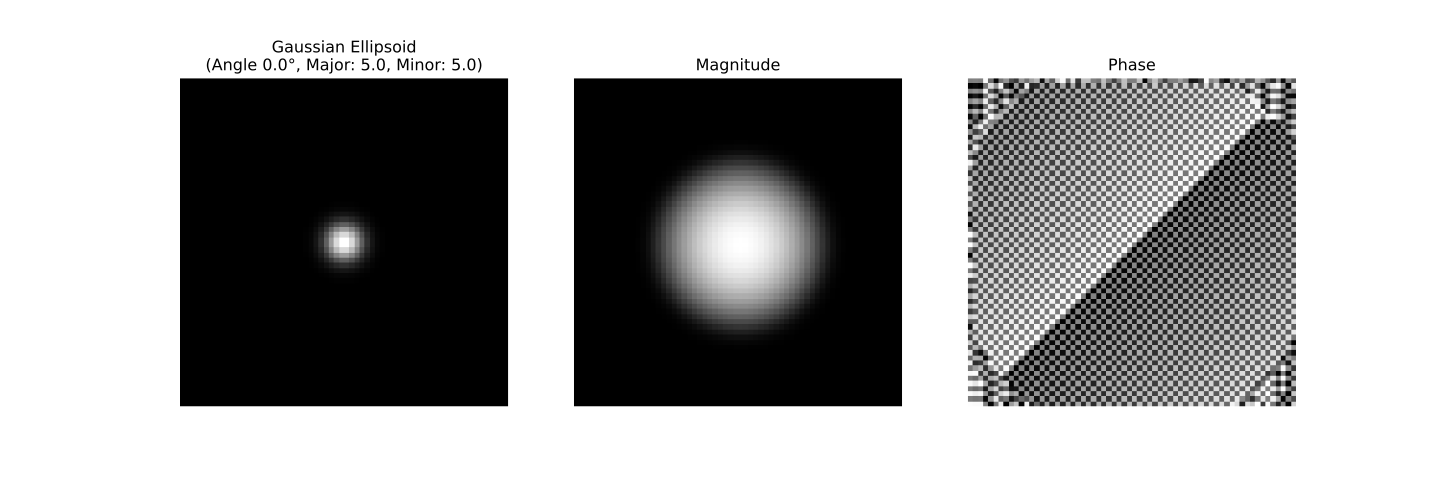
Gaussian ellipse
[2]:
import numpy as np
import matplotlib.pyplot as plt
from ipywidgets import interactive
import ipywidgets as widgets

# Function to generate a Gaussian ellipsoid pattern with adjustable major/minor axis and orientation
def generate_gaussian_ellipsoid(angle_deg, major_axis=10, minor_axis=5, image_size=64):
    angle = np.deg2rad(angle_deg)

    # Create a grid of coordinates
    y, x = np.meshgrid(np.linspace(-1, 1, image_size), np.linspace(-1, 1, image_size))

    # Rotate the grid by the specified angle
    x_rot = x * np.cos(angle) + y * np.sin(angle)
    y_rot = -x * np.sin(angle) + y * np.cos(angle)

    # Create the Gaussian ellipsoid pattern
    gaussian = np.exp(-((x_rot**2) / (2 * (major_axis / image_size)**2) + (y_rot**2) / (2 * (minor_axis / image_size)**2)))

    return gaussian * 255  # Normalize to [0, 255] for display purposes

# Function to update and display the Fourier transform for the Gaussian ellipsoid as the parameters change
def update_gaussian_ellipsoid(angle_deg, major_axis, minor_axis, save_as_svg=False):
    # Generate the Gaussian ellipsoid pattern with the given parameters
    image = generate_gaussian_ellipsoid(angle_deg, major_axis, minor_axis)

    # Perform 2D Fourier transform
    f_transform = np.fft.fftshift(np.fft.fft2(image))

    # Calculate magnitude and phase
    magnitude = np.abs(f_transform)
    phase = np.angle(f_transform)

    # Plot the original image, magnitude, and phase
    fig, axs = plt.subplots(1, 3, figsize=(15, 5))

    axs[0].imshow(image, cmap='gray')
    axs[0].set_title(f"Gaussian Ellipsoid\n(Angle {angle_deg}°, Major: {major_axis}, Minor: {minor_axis})")
    axs[0].axis('off')

    axs[1].imshow(np.log(1 + magnitude), cmap='gray')
    axs[1].set_title("Magnitude")
    axs[1].axis('off')

    axs[2].imshow(phase, cmap='gray')
    axs[2].set_title("Phase")
    axs[2].axis('off')

    # Save the plot as an SVG if requested
    if save_as_svg:
        plt.savefig('gaussian_ellipsoid_plot.svg', format='svg')
        print("Plot saved as 'gaussian_ellipsoid_plot.svg'")

    plt.show()

# Create interactive widgets for adjusting the ellipsoid's orientation, major/minor axis and save option
interactive_plot = interactive(update_gaussian_ellipsoid,
                               angle_deg=widgets.FloatSlider(value=0, min=0, max=180, step=1, description='Angle (°):'),
                               major_axis=widgets.FloatSlider(value=5., min=1, max=20, step=1, description='Major Axis:'),
                               minor_axis=widgets.FloatSlider(value=5, min=1, max=20, step=1, description='Minor Axis:'),
                               save_as_svg=widgets.Checkbox(value=False, description='Save as SVG'))

output = interactive_plot.children[-1]
output.layout.height = '400px'
interactive_plot
[2]:
[ ]: